Table of Contents
- Introduction
- How to use the TikTok Shop dashboard as an operating system
- 1. Build role-based dashboard ownership
- 2. Manage orders, stock, and customer risk daily
- 3. Connect creator and content activity with products
- 4. Use analytics and score data for action
- Getting Started with the TikTok Shop Manager Dashboard
- Navigating the TikTok Shop Manager Dashboard Interface
- Product Management: Adding, Organizing, and Optimizing Products
- Order Fulfillment and Customer Service in the Dashboard
- Marketing Your Products: TikTok Ads and Promotional Campaigns
- How Eva Can Help?
- Advanced Analytics and Performance Tracking
- Conclusion
- TikTok Shop Seller Center FAQs
Introduction
TikTok has evolved from being a fun video-sharing app into one of the most dynamic e-commerce platforms available today.
How to use the TikTok Shop dashboard as an operating system
Quick answer: Use Seller Center to manage products, orders, inventory, promotions, affiliate activity, customer service, analytics, finance, and account health, but organize the review around exceptions and decisions. Check urgent order, stock, service, policy, and settlement signals daily, then connect content, creator, advertising, product, and contribution in a weekly operating review.
A dashboard does not create control by itself. The team needs stable definitions, owners, thresholds, and actions. TikTok Shop also updates navigation and score methodology, so screenshots and metric names in older tutorials can become outdated. Use current Seller Center and TikTok Shop Academy as the interface source of truth while preserving a consistent internal decision framework.
| Cadence | Review | Decision |
|---|---|---|
| Daily | Orders, dispatch, stock, service, violations, and settlements | Resolve customer and account risk |
| Campaign | Creators, content, LIVE, affiliate, ads, and products | Scale, redirect, or stop demand |
| Weekly | Completed orders, returns, contribution, cohorts, and inventory | Move capital and fix root causes |
| Monthly | Finance reconciliation, score trends, and controls | Update plan, access, and process |
1. Build role-based dashboard ownership
Assign named owners for catalog, inventory, orders, fulfillment, service, creator, LIVE, affiliate, ads, finance, and account health. Use least-privilege access and brand-controlled accounts. Define which alerts require immediate action and which belong in a weekly review. Avoid shared credentials that make changes and accountability impossible to trace.
2. Manage orders, stock, and customer risk daily
Review unshipped orders, dispatch deadlines, tracking, cancellations, returns, refunds, service queues, available and locked stock, inbound risk, and policy notifications. Assign the next action and owner. A total GMV tile can look healthy while a small group of aging orders or customer cases creates significant account and reputation risk.
3. Connect creator and content activity with products
Review creator samples, affiliate orders, content, LIVE, promotions, product clicks, completed orders, stock, and contribution together. Separate discovery from conversion. When a product accelerates, confirm fulfillment before adding paid reach. When performance weakens, diagnose audience, message, product page, offer, price, reviews, inventory, or service instead of changing bids blindly.
4. Use analytics and score data for action
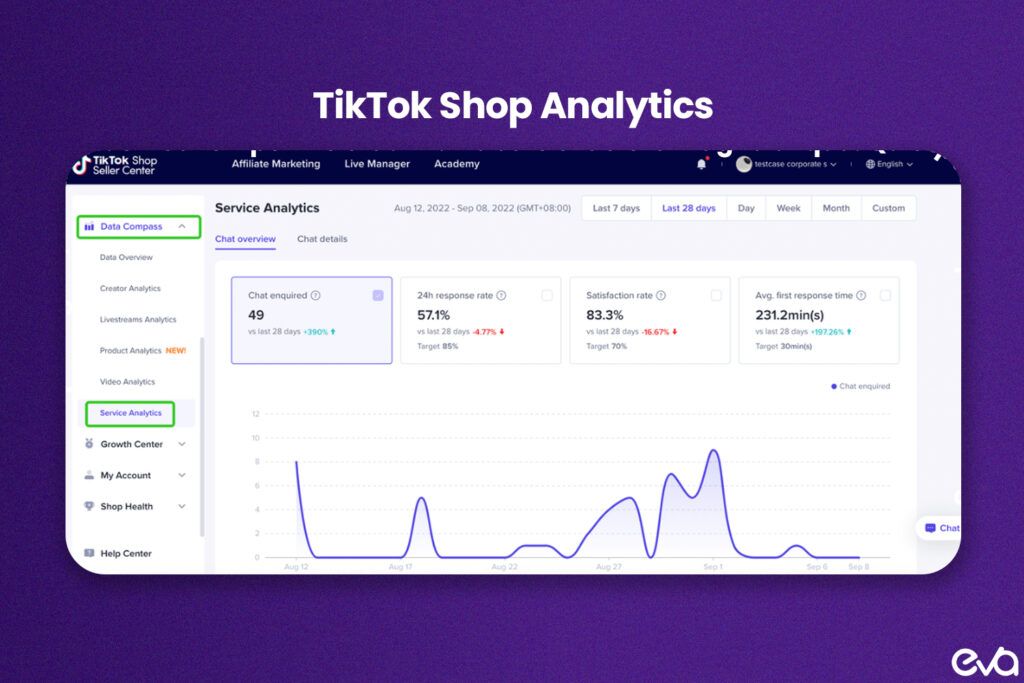
Track customer, product, content, creator, order, and financial outcomes with stable internal definitions. TikTok Shop currently provides Service Analytics and a Shop Performance Score whose components can evolve. Confirm the current methodology, then map every weak signal to a root-cause owner. Reconcile platform sales with completed orders, fees, refunds, creator cost, ads, and product contribution.
Primary sources: Current TikTok Shop Academy resources describe stock dashboards with available and locked inventory, Service Analytics for customer operations, and an evolving Shop Performance Score. Review stock management, Service Analytics, and the current Shop Performance Score.
Related Eva resources: TikTok Shop Management, TikTok Shop Growth Playbook, TikTok Shop Analytics.
TikTok Shop, integrated with the platform’s extensive social ecosystem, enables brands to showcase and sell their products directly within the app.
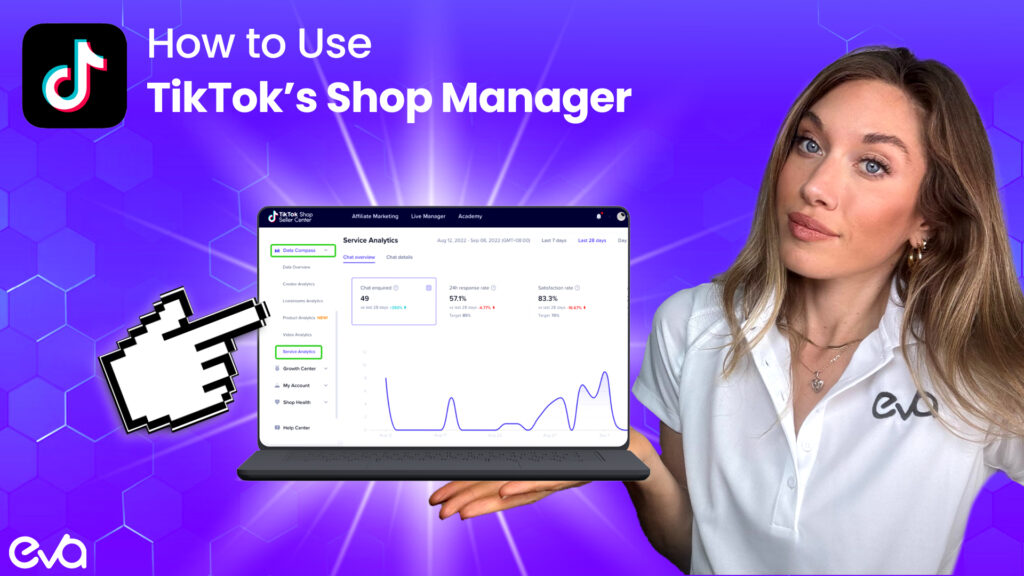
The TikTok Shop Manager Dashboard is the essential tool for any seller looking to optimize their TikTok Shop experience, manage inventory, and drive sales effectively.
This comprehensive guide will explore everything you need to know about TikTok’s Shop Manager Dashboard.
This article will explain everything step-by-step, from understanding its core features to leveraging its tools for better product listings, marketing campaigns, and performance tracking.
By the end, you’ll be able to maximize your TikTok Shop’s potential, optimize sales strategies, and effectively manage your store.
Want a team to run the dashboard with you? This guide covers how to use Seller Center day to day. If you are comparing TikTok Shop management services, see Eva’s service page for setup, creators, content, ads and shop operations, or book a call.
Getting Started with the TikTok Shop Manager Dashboard
Quick answer: Before diving into the technicalities, let’s understand how to start with TikTok Shop Manager. The dashboard is accessible to registered businesses and verified sellers. Here’s how you can set up and begin using it:
Before diving into the technicalities, let’s understand how to start with TikTok Shop Manager. The dashboard is accessible to registered businesses and verified sellers.
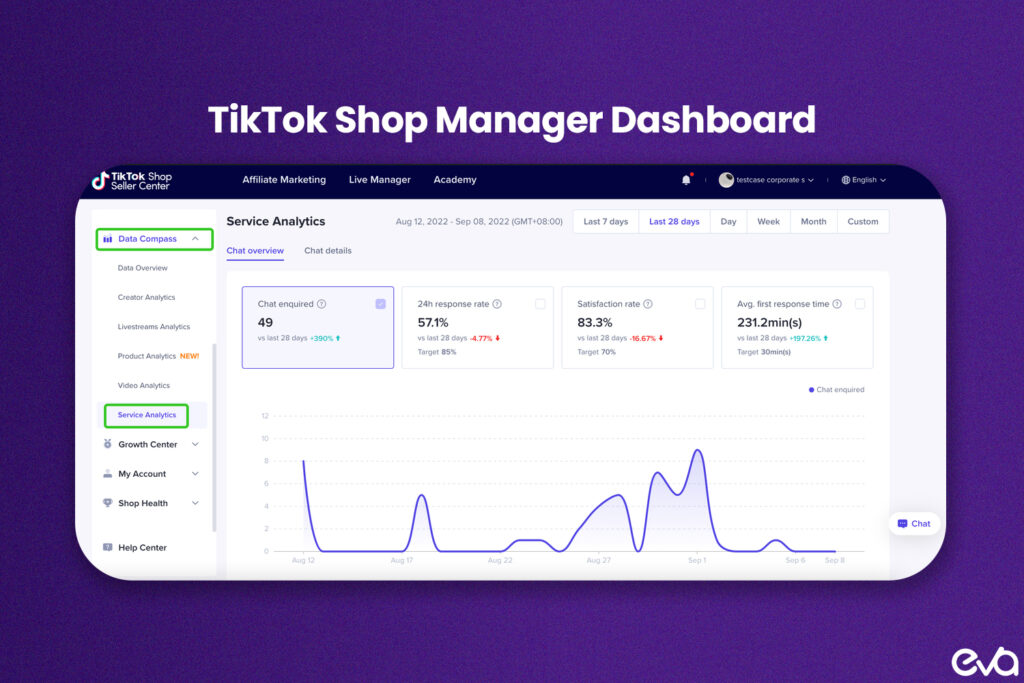
Here’s how you can set up and begin using it:
Setting Up Your TikTok Shop Account
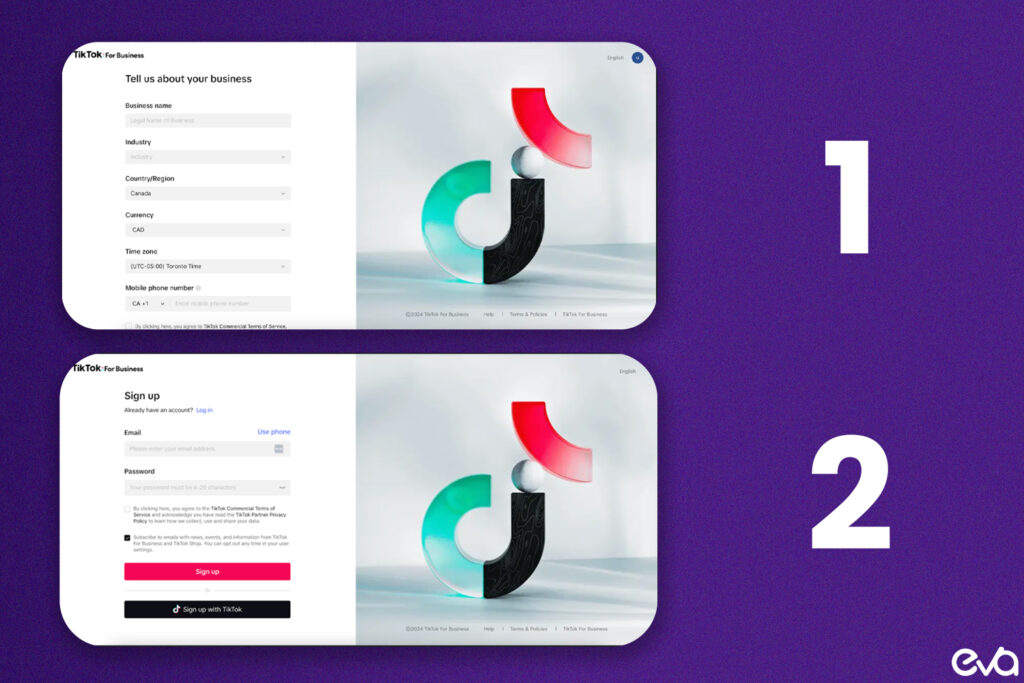
Quick answer: To access the TikTok Shop Manager Dashboard, you must first sign up for TikTok Shop. Navigate to the official TikTok Shop registration page and provide the necessary details about your business, such as company name, contact information, and payment preferences.
To access the TikTok Shop Manager Dashboard, you must first sign up for TikTok Shop.
Navigate to the official TikTok Shop registration page and provide the necessary details about your business, such as company name, contact information, and payment preferences.
TikTok will review your business information; once approved, you’ll gain access to the dashboard.
Integrating TikTok Shop with Your Store
Quick answer: If you already have an existing e-commerce store on platforms like Shopify, WooCommerce, or BigCommerce, TikTok provides integration tools to sync your products and orders. These integrations allow you to manage your products from your central e-commerce platform while utilizing TikTok’s audience and marketing tools.
If you already have an existing e-commerce store on platforms like Shopify, WooCommerce, or BigCommerce, TikTok provides integration tools to sync your products and orders.
These integrations allow you to manage your products from your central e-commerce platform while utilizing TikTok’s audience and marketing tools.
This setup allows you to scale your brand’s reach by tapping into TikTok’s vast, engaged user base while simplifying your backend operations.
Quick answer: Once logged into the TikTok Shop Manager Dashboard, you’ll encounter an interface designed for ease of use while offering powerful features. Here’s a breakdown of the core sections:
Once logged into the TikTok Shop Manager Dashboard, you’ll encounter an interface designed for ease of use while offering powerful features. Here’s a breakdown of the core sections:
Dashboard Overview
Quick answer: The dashboard’s landing page provides a quick overview of your shop’s performance. It shows critical metrics such as total sales, active orders, conversions, and customer engagement. This summary helps you gauge your shop’s health at a glance and prioritize key actions based on the data provided.
The dashboard’s landing page provides a quick overview of your shop’s performance. It shows critical metrics such as total sales, active orders, conversions, and customer engagement.
This summary helps you gauge your shop’s health at a glance and prioritize key actions based on the data provided.
Main Navigation Menu
Quick answer: Main Navigation Menu is important for How to Use TikTok’s Shop Manager Dashboard because it shapes how Amazon teams make decisions, prioritize work, and measure whether marketplace activity is producing profitable growth. The left-hand sidebar contains the primary menu for accessing all the essential features of the dashboard. Here, you can access:
The left-hand sidebar contains the primary menu for accessing all the essential features of the dashboard. Here, you can access:
- Products: Manage product listings, add new items, and track inventory.
- Orders: View and process incoming orders, track shipping, and manage returns.
- Marketing: Set up promotions, discounts, and TikTok Ads campaigns.
- Analytics: View detailed reports on sales, performance, and customer behavior.
- Finance: Manage payouts, track revenue, and view transaction details.
Customizable Widgets
TikTok Shop Manager offers customizable widgets on the main screen to optimize your workflow.
These widgets allow you to highlight the most critical aspects of your shop, such as recent orders or sales trends, making it easier to manage multiple tasks without switching between sections.
Product Management: Adding, Organizing, and Optimizing Products
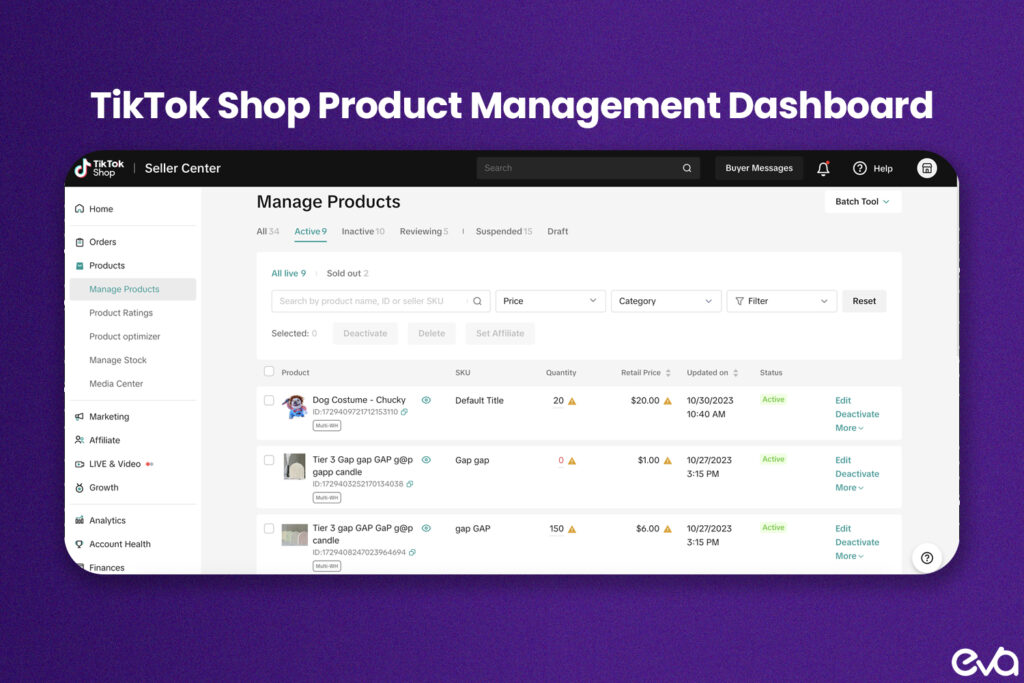
Product management is one of the most crucial functions of the TikTok Shop Manager Dashboard. It allows you to list new products, optimize existing listings, and keep track of inventory.
Adding New Products
To add a product, click on the Products section and choose “Add New Product.” You’ll be prompted to provide several key pieces of information, including:
- Product Name: Use clear, descriptive titles that align with search terms customers might use.
- Price: Enter your price, including any applicable taxes or fees.
- Description: Craft an engaging and informative product description detailing features and benefits.
- Product Media: Upload high-quality images and videos showcasing the product. Use lifestyle images that align with TikTok’s content-driven environment.
- SKU and Inventory: Provide your product SKU and stock count. Keeping inventory levels updated is crucial for preventing overselling.
Organizing Products
As your product catalog grows, you’ll need efficient ways to organize your items. The dashboard allows you to categorize products for better organization and more straightforward navigation.
You can also use tags and keywords to ensure your products are discoverable through TikTok’s search. Optimizing these elements will help improve visibility on the platform.
Optimizing Product Listings
TikTok’s search algorithm relies on product titles, descriptions, and keywords to match users with relevant products. To optimize your product listings:
- SEO Optimization: Ensure your product descriptions include relevant keywords that users may search for. If you’re an Amazon seller, apply strategies similar to Amazon Listing Optimization to improve discoverability.
- Content Alignment: TikTok is a visual platform, so your product media should align with trends. Use videos that showcase your product in real-life scenarios and incorporate user-generated content when possible.
- Product Variations: If you offer different sizes, colors, or flavors, use TikTok’s variation feature to manage these multiple options seamlessly.
Order Fulfillment and Customer Service in the Dashboard
Managing orders efficiently is essential to maintaining customer satisfaction. The TikTok Shop Manager Dashboard simplifies this process with tools to help you track and fulfill orders in real-time.
Processing Orders
Once a customer makes a purchase, the order appears in the Orders section of the dashboard. You can filter orders by various criteria, such as date, status, or product. From here, you can:
- Confirm the Order: Mark the order as confirmed once you’ve received payment.
- Track Shipment: Sync with your shipping provider to provide tracking details.
- Manage Returns and Cancellations: The dashboard enables you to process a customer’s return or cancellation request smoothly.
Customer Service and Communication
Good customer service is crucial for maintaining a positive brand reputation. TikTok Shop Manager allows you to communicate directly with customers through the Messages section, where you can:
- Answer customer queries promptly.
- Address complaints or issues.
- Provide updates on order statuses.
Effective customer communication can lead to repeat customers and positive reviews, which can also directly impact your Amazon Sales Growth on TikTok.
Marketing Your Products: TikTok Ads and Promotional Campaigns
TikTok is a highly engaging platform, and to make the most of it, you need to use the marketing tools available. The Marketing section in the dashboard gives you access to promotional features that can drive sales.
TikTok Ads
TikTok Ads are one of the most powerful tools for boosting your shop’s visibility. You can create video-based ad campaigns that target specific audience segments based on demographics, interests, or behavior.
- Campaign Creation: Set your campaign objectives (e.g., sales, traffic, or brand awareness) and choose your targeting options.
- Creative Optimization: Leverage TikTok’s creative tools to design ads that resonate with users. Use short, engaging videos that feel native to TikTok’s environment.
- Performance Tracking: Monitor your campaigns’ performance in real-time. The dashboard provides metrics like impressions, clicks, and conversions to help you fine-tune your ads.
Promotions and Discounts
Creating time-limited promotions, such as flash sales or seasonal discounts, can drive urgency and increase sales volume. Use the dashboard to schedule promotions and track how they affect your sales.
How Eva Can Help?
As brands navigate the complexities of selling across multiple e-commerce platforms like TikTok, Amazon, Walmart, and others, optimizing your advertising strategies and making data-driven decisions is crucial to maintaining a competitive edge. This is where Eva comes in.
Eva is a leading eCommerce technology company helping brands achieve sustainable growth and profitability across all major marketplaces.
Leveraging our unique AI platform and expert support, Eva ensures that brands can optimize their advertising strategies, improve efficiency, reduce wasted spending, and maximize their return on investment (ROI).
One of the core features of Eva’s offering is our context-aware AI platform.

Unlike traditional advertising platforms that optimize based on individual metrics, Eva’s platform takes a holistic approach by integrating critical business data across multiple marketplaces-such as inventory levels, conversion rates, and profitability metrics.
This ensures that your advertising strategies align with your business goals and customer demand.
When you use TikTok’s Shop Manager Dashboard, you can access several tools for managing products, tracking performance, and running marketing campaigns.
However, making the most of these tools often requires analyzing data from various sources, including your inventory, sales history, and customer behavior.
Eva’s AI platform takes this complexity off your plate by automatically analyzing this data and providing actionable insights.
Whether running TikTok Ads or managing promotions through TikTok’s Shop Manager, Eva’s AI can help you make smarter decisions. For example, Eva’s AI can:
- Optimize Ad Spend: Eva helps you adjust your ad spend in real-time by integrating product performance and inventory data. This ensures you always pay for underperforming products and allocate more of your budget to high-conversion items.
- Ensure Inventory Alignment: Eva ensures your advertising efforts are synchronized with available inventory, reducing the risk of overselling or promoting out-of-stock items, which can lead to customer dissatisfaction.
- Improve Conversion Rates: Eva analyzes customer behavior and product performance to help you identify which products perform best on TikTok and recommend improvements for underperforming listings, improving overall conversion rates.
Eva doesn’t just work with TikTok. As an Amazon Advanced Partner and Walmart Strategic Solution Partner, Eva’s AI integrates seamlessly across all major marketplaces, including Amazon Advertising, Walmart Ads, and TikTok Ads, as well as platforms like eBay, Shopify, Google, Meta, Wayfair, and Faire.
This cross-platform integration ensures your brand’s advertising strategy is optimized on one platform and across your entire e-commerce ecosystem.
For example, a brand may run ads on TikTok while managing an Amazon FBA business. With Vueria, you can align these efforts and use shared data to refine your strategies across both platforms.
Whether adjusting Amazon PPC Management or optimizing TikTok promotions, Vueria offers a unified approach that enhances overall Amazon Sales Growth.
At Eva, we are committed to helping brands scale and achieve profitable growth across e-commerce platforms.
Whether you are managing a TikTok Shop or looking to expand on Amazon, our AI-driven tools provide invaluable insights and automation to optimize your advertising efforts.
Eva’s team of experts doesn’t just provide automated solutions; we analyze your data to identify actionable insights.
Our approach ensures you are constantly making the best possible decisions to drive sales, improve Amazon Listing Optimization, and reduce advertising waste.
By integrating AI, expert support, and data-driven strategies, Eva helps brands:
- Achieve higher ROAS (Return on Ad Spend) and ROI (Return on Investment)
- Improve inventory management to prevent overselling or stockouts
- Make smarter decisions based on real-time data and trends
- Scale across multiple marketplaces with one unified approach
- Drive brand growth through more innovative, more efficient marketing campaigns
Ready to Scale Your Brand? Let Eva Help You Succeed.
Whether you’re just starting with TikTok Shop or looking to optimize your Amazon Advertising strategies, Eva is here to help.
Our unique AI platform and dedicated team of eCommerce experts are ready to take your brand to the next level.
Contact Eva today and discover how our AI-driven solutions can maximize your performance, streamline your operations, and drive profitable growth across all marketplaces.
Advanced Analytics and Performance Tracking
Analytics is where you can truly understand how your shop is performing. TikTok’s Analytics section is robust, offering insights into customer behavior, sales trends, and more.
Tracking Sales Performance
The TikTok Shop Manager Dashboard tracks sales by product, category, and period. By analyzing this data, you can identify best-sellers and underperforming products.
These insights allow adjusting your marketing and inventory strategies to optimize your Amazon PPC Management across platforms.
Customer Insights
Review demographic data, purchase behavior, and engagement patterns to understand your customers better. Knowing your customers’ preferences helps tailor future campaigns and product launches.
Conversion Rates
Conversion tracking is critical to understanding the effectiveness of your marketing campaigns. The dashboard lets you monitor how many visitors to your TikTok Shop are making purchases, allowing you to tweak your sales funnel and optimize for higher conversion rates.
Conclusion
The TikTok Shop Manager Dashboard is a powerful, user-friendly tool that enables businesses to efficiently manage their products, orders, marketing, and customer service from one centralized location.
By understanding its full range of features and applying the right strategies, you can enhance your Amazon Growth Strategy, expand your brand’s reach, and drive sales.
Whether you’re a brand just starting on TikTok Shop or an experienced seller looking to optimize your store, the dashboard is an invaluable asset to your e-commerce toolkit.
By integrating TikTok Shop with your broader Amazon Marketing Services and Amazon Account Management strategies, you can maximize your brand’s growth potential across multiple channels, ensuring sustainable success in a competitive marketplace.
TikTok Shop Seller Center FAQs
Seller Center is the web dashboard TikTok Shop sellers use to run their shop. From it you manage product listings, orders and shipping, returns and refunds, promotions, affiliate creators, customer messages, analytics, finance and payouts, and account health.
Register as a TikTok Shop seller, submit your business and identity details for verification, and add your bank or payout details. TikTok reviews the application before selling features open. Requirements differ by country, so follow the current TikTok Shop registration steps for your market.
Yes. TikTok Shop offers integrations with ecommerce platforms, including a TikTok app for Shopify, that can sync products, inventory and orders. Before going live, confirm which fields sync and which system is the source of truth for price and stock.
Use the Orders section. Review unshipped orders, dispatch deadlines, tracking, cancellations, returns and refunds every day. Late dispatch and unresolved customer cases can affect your account health.
The Affiliate section lets you set commission rates on products, invite creators to promote them, manage free sample requests, and track affiliate orders and content. Review creator activity alongside stock so a product that gains traction does not sell out.
Analytics reports on sales, products, traffic, content such as videos and LIVE sessions, and creator performance. TikTok Shop also provides Service Analytics for customer service. Reconcile platform sales with completed orders, refunds, fees and creator commissions before judging profit.
It is a 0 to 5 score that TikTok Shop calculates from product satisfaction, fulfillment and logistics, and customer service metrics. In the US, a shop receives one after 30 delivered orders in the past 90 days. The score affects access to programs such as campaigns and affiliate marketing, and settlement timing. Find it under Account Health in Seller Center, and check the current TikTok Shop Academy guide because thresholds and metrics change.
Yes. The shop owner can add team members with role-based permissions in the account settings. Keep the main account owned by the brand, give each person only the access they need, and avoid shared logins so changes can be traced.
Check orders, dispatch, stock, service queues and policy notices daily. Review creators, content, LIVE, ads and promotions weekly with returns and contribution. Reconcile finance and review score trends monthly.