Most Shopify stores have a traffic problem disguised as a conversion problem. Visitors arrive, browse, and leave, not because they dislike the product, but because something in the experience gave them pause. A slow page, a confusing product description, a surprise shipping cost at checkout, or simply a lack of trust can all silently kill a sale.
Table of Contents
- 2026 operator note: conversion fixes should follow traffic reality
- What Is Shopify Conversion Optimization?
- How to Calculate Your Shopify Conversion Rate
- What Is a Good Shopify Conversion Rate?
- Start With a Shopify CRO Audit Before Changing Anything
- Shopify Conversion Optimization Strategies That Matter Most
- How to Prioritize Shopify CRO Changes
- Common Shopify CRO Mistakes to Avoid
- Shopify conversion optimization starts with the revenue leak
- Conclusion
- FAQs
2026 operator note: conversion fixes should follow traffic reality
The right CRO work depends on where traffic comes from, what product shoppers see first, what objections block purchase, and whether the order can be profitable. Conversion should be managed with acquisition and lifecycle, not as a design-only exercise.
Related Eva resources: Shopify Management, Shopify product page optimization, Shopify CRO Playbook.
Shopify conversion optimization is the process of reducing friction across every step of the customer journey, so that more visitors complete a purchase or take the desired action. This guide walks you through calculating and benchmarking your conversion rate, diagnosing where you’re losing sales, and prioritizing which tactics to pursue first. If you’d rather have a team manage this end-to-end, Eva’s Shopify growth management service covers CRO, lifecycle, SEO, and store operations within a single system.
What Is Shopify Conversion Optimization?
Definition: Shopify conversion optimization (CRO) is the practice of improving your store’s user experience, messaging, speed, trust signals, and checkout flow to increase the percentage of visitors who complete a desired action, most commonly a purchase.
A “conversion” doesn’t always mean a completed order. Depending on your goals, it can also mean:
• Adding a product to the cart
• Starting or completing checkout
• Signing up for an email list
• Creating an account
• Engaging with a product page
That said, purchase conversion rate is the core metric for most Shopify merchants.
CRO is not just about design. It spans the clarity of your product messaging, the credibility of your brand, the usability of your navigation, the speed of your pages, the honesty of your pricing, and the confidence customers feel before handing over payment details. Think of it as reducing every reason a visitor might hesitate.
Conversion rate definition: Your conversion rate is the percentage of store sessions that result in the desired action. For e-commerce stores, this is most commonly the percentage of sessions that result in a completed purchase.
How to Calculate Your Shopify Conversion Rate
The formula is straightforward:
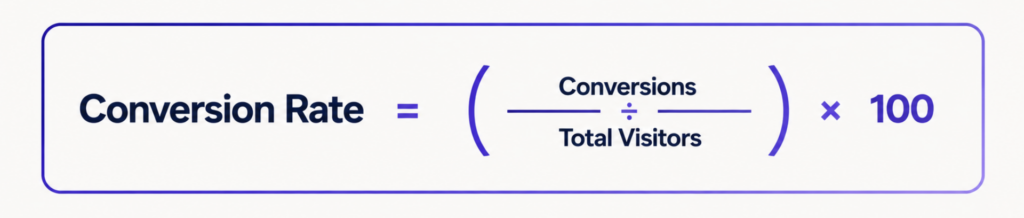
Example: If your store had 8,000 sessions last month and 192 resulted in a purchase, your store’s conversion rate is:

Shopify Analytics shows this figure in your dashboard, but the number alone tells you very little. What matters more is understanding where in the funnel you’re losing people.
Shopify breaks the purchase funnel into four measurable stages:
1. Sessions: total store visits
2. Sessions with add to cart: visitors who added at least one product
3. Sessions that reached checkout: visitors who started the checkout process
4. Sessions converted: visitors who completed a purchase
Each drop between stages is a signal. If 30% of visitors add items to their carts but fewer than 5% reach checkout, there is friction in your cart or product page experience. If 60% reach checkout but only 15% complete it, the problem is in your checkout flow.
Which Shopify CRO Metrics Should You Track?
Tracking one number isn’t enough. Here are the metrics worth monitoring and what each one tells you:
| Metric | What It Reveals | Where to Find It |
| Store conversion rate | Overall purchase funnel health | Shopify Analytics |
| Add-to-cart rate | Product page effectiveness | Shopify Analytics |
| Checkout abandonment rate | Friction in the payment or shipping stage | Shopify Analytics |
| Average order value (AOV) | Revenue efficiency per customer | Shopify Analytics |
| Revenue per visitor (RPV) | Combined impact of CR + AOV | Calculate manually |
| Bounce rate/engagement rate | Landing page relevance and quality | Google Analytics 4 |
| Page load speed / Core Web Vitals | Technical performance friction | Google Search Console, PageSpeed Insights |
Revenue per visitor warrants special attention, as it combines conversion rate and average order value into a single metric, making it easier to compare the impact of different CRO changes. Core Web Vitals are Google’s standardized performance benchmarks; Interaction to Next Paint (INP) measures how quickly your store responds to user input, which directly affects frustration levels on slower connections.
What Is a Good Shopify Conversion Rate?
There’s no single “good” number, and articles that quote a universal benchmark are usually oversimplifying. What counts as a strong conversion rate depends on:
• Product category: high-consideration purchases (furniture, electronics) convert lower than impulse or consumable items
• Traffic source: email and SMS traffic from existing customers converts far higher than cold paid social
• Price point: a $12 product and a $450 product will not convert at the same rate, and shouldn’t be expected to
• Brand awareness: Established brands with strong organic search presence typically convert better than new stores with no brand recognition
• Device mix: mobile sessions generally convert lower than desktop, so a store with 80% mobile traffic will show a different aggregate rate
The most honest approach: establish your own baseline, then track whether your changes move it in the right direction over time. Chasing an industry average without context can push you to optimize for the wrong things.
If you do want directional context, current ecommerce benchmark reports (Klaviyo, Littledata, and IRP Commerce publish annual benchmarks) can give you a reference range for your category, but treat them as context, not targets.
Start With a Shopify CRO Audit Before Changing Anything
Most stores make the mistake of jumping straight to tactics (redesigning product pages, installing apps, changing button colors) without understanding where they’re actually losing sales. Before you change anything, spend time diagnosing the problem.
Here’s a quick audit checklist:
Shopify Analytics (funnel data)
• Review your add-to-cart rate, reached-checkout rate, and purchase conversion rate
• Compare rates across the last 30, 60, and 90 days, look for trends, not just snapshots
• Identify your highest-traffic product pages and check their individual conversion data
• Compare mobile vs. desktop conversion rates; significant gaps usually mean a mobile UX problem
Page speed and technical health
• Run your homepage, a top product page, and your collection page through Google PageSpeed Insights
• Check Core Web Vitals in Google Search Console under “Experience.”
• Note any pages with LCP (Largest Contentful Paint) over 2.5 seconds or poor INP scores
Qualitative research
• Review customer support tickets and live chat logs for recurring friction points
• Read your 3-star and 4-star reviews; they often mention what nearly stopped someone from buying
• Watch session recordings (using tools like Hotjar or Microsoft Clarity) on your top product pages
• Check heatmaps to see where users click, scroll, and stop
Trust and policy audit
• Is your return policy clearly visible on product pages or near the add-to-cart button?
• Are shipping costs and estimated delivery times shown before checkout?
• Does your checkout display security badges and accepted payment methods?
The audit turns a generic “improve CRO” goal into a specific list of friction points ranked by funnel impact. That prioritization is what makes the difference between random changes and a real lift in revenue. If you need a more structured approach, Eva’s Conversion & Retention platform surfaces these signals automatically for Shopify brands.
Shopify Conversion Optimization Strategies That Matter Most
The tactics below are organized by funnel stage, not alphabetically. Work from the areas where you’re losing the most people first.
Optimize Product Pages for Clarity and Confidence
Your product detail page (PDP) is where most buying decisions are made. If the page doesn’t answer every important question a visitor has, they’ll leave to find the answer elsewhere, and often not come back.
What to improve on product pages:
• Product titles and descriptions: lead with the benefit, then add specifics. A two- or three-sentence description that explains who the product is for and what problem it solves often outperforms a long, spec-heavy wall of text.
• Images and video: use multiple angles, lifestyle shots, and close-up detail photos. For products where fit or scale matters, include a size reference. 360-degree views and short demonstration videos can reduce uncertainty for high-consideration purchases, but aren’t necessary for every store.
• Specs and fit details: size guides, compatibility notes, materials, dimensions, and use cases reduce returns and pre-purchase hesitation. Answer the questions your support team hears most.
• Price, availability, and shipping: these should all be visible above the fold without scrolling. If a product is low in stock, say so. If shipping is free over a threshold, make that visible on the product page, not just the cart.
• CTA placement: your add-to-cart button should be prominent, above the fold on desktop, and easily tappable without zooming on mobile.
Build Trust With Reviews, UGC, and Social Proof
For newer or smaller Shopify brands, trust is the biggest barrier to conversion. A visitor who’s never heard of your store is asking one underlying question: Is this real, and will I actually get what I ordered?
Trust signals that work:
• Product reviews with verified purchase labels: quantity matters early on; quality matters later. Even 15–20 genuine reviews make a significant difference.
• Customer photos and video: user-generated content (UGC) showing real people using the product consistently outperforms studio photography for certain categories.
• Press mentions and brand logos: if you’ve been featured in media, show it.
• Clear, confident policies: a 30-day return policy shown near the add-to-cart button does more for conversion than most design changes.
• Security indicators at checkout: SSL badge, recognized payment logos (Visa, Mastercard, Shop Pay), and a clean, branded checkout reduce payment anxiety.
Review platforms like Okendo, Judge.me, or Yotpo integrate natively with Shopify and allow photo reviews. Choose one and implement it consistently rather than splitting UGC across multiple tools.
Improve Mobile Experience
More than half of e-commerce traffic is mobile, but mobile conversion rates consistently lag behind desktop conversion rates. The gap is almost always a usability issue, not a device issue.
Mobile-specific improvements to prioritize:
• Thumb-friendly navigation: primary actions (search, cart, menu) should be reachable without shifting grip. Bottom navigation bars work better than header menus on mobile.
• Sticky add-to-cart button: a persistent CTA as users scroll down a product page reduces the distance between decision and action.
• Cart drawer: a slide-in cart panel keeps users on the product page instead of redirecting them to a separate cart page, which reduces exit points.
• Fast load times: mobile connections are less reliable; a page that loads in 4 seconds on desktop may take 8+ on a poor 4G connection.
• Fewer popups: email capture popups that fire immediately on mobile create immediate friction. Use them sparingly, with delays, and make them easy to dismiss.
• Simplified filtering: if your collections have many products, collapsible filter panels with large tap targets make product discovery far easier on small screens.
Speed Up Your Shopify Store
Page speed affects both conversion rate and SEO rankings. A one-second delay in page load can measurably impact purchase intent, especially on mobile. Shopify’s platform handles much of the infrastructure automatically, but your theme and installed apps have a significant impact on performance.
Where to focus:
• Theme selection and customization: Shopify’s newer themes (Dawn, Refresh) are built for performance. Older or heavily customized themes can carry significant script and render bloat. Run PageSpeed Insights on your current theme to get a baseline.
• Image optimization: use WebP format where possible, compress images before upload, and implement lazy loading so images below the fold don’t block initial page render.
• App script audit: Every app you install can add JavaScript to your storefront. Unused or redundant apps quietly slow every page load. Audit your installed apps quarterly and remove any that aren’t actively contributing to revenue.
• Core Web Vitals: Google’s performance benchmarks (LCP, INP, CLS) affect your search ranking. Shopify’s built-in performance report and Google Search Console’s Core Web Vitals report are good starting points.
Reduce Checkout Friction
Cart abandonment happens at every store, but a meaningful portion of it is preventable. The most common causes: unexpected costs, required account creation, complicated forms, and uncertainty about payment security.
Shopify-specific checkout improvements:
• One-page checkout: Shopify’s streamlined one-page checkout (now the default for most plans) reduces the number of steps between cart and purchase. If you’re on an older checkout setup, migrating should be a priority.
• Shop Pay: Shopify’s accelerated checkout option lets returning customers complete a purchase in two taps with saved payment and address details. Stores with Shop Pay enabled typically see higher checkout completion rates.
• Guest checkout: forcing account creation before purchase is a conversion killer, especially for first-time buyers. Make guest checkout visible and easy to find.
• Transparent costs before checkout: show shipping cost estimates on product pages or the cart. A $10 shipping fee that appears for the first time at checkout is far more damaging than the same fee shown earlier, when the customer has already decided they want the product.
Clarify Shipping, Returns, and Guarantees
Pre-checkout anxiety is one of the most underrated conversion killers. Many potential customers abandon not because of checkout friction, but because they can’t find clear answers to the question: “What if I don’t like it?” How long will this take? What does shipping cost?
Address this anxiety proactively:
• Shipping costs and delivery estimates: display these on product pages, not just in your footer or FAQ. For stores with free shipping thresholds, show a cart progress bar (“Add $15 more for free shipping”).
• Return window and process: “30-day free returns” or “hassle-free returns” near the add-to-cart button removes a major barrier for unsure buyers.
• Money-back guarantees: where relevant to your product category, explicit guarantees reduce perceived purchase risk.
• Estimated delivery dates: “Arrives by Thursday, May 15” is more persuasive than “5–7 business days.” Shopify’s native shipping settings and certain carrier integrations can automatically surface estimated delivery dates.
Personalize the Customer Journey
Personalization doesn’t require an enterprise budget. Even basic customization of the customer journey can improve relevance and reduce decision fatigue.
Practical personalization for Shopify:
• Product recommendations: Shopify’s native “You may also like” and “Frequently bought together” blocks increase average order value and help customers find relevant products faster.
• Segmented landing pages: if you’re running paid social campaigns, send traffic to a landing page or collection tailored to that audience rather than your generic homepage.
• Email and SMS recovery flows: abandoned cart and browse abandonment automations are some of the highest-ROI tools available to Shopify merchants. Klaviyo, Omnisend, and Shopify Email all support these out of the box.
• Returning customer experience: customers who’ve purchased before convert at significantly higher rates. Use email and SMS to bring them back with relevant new arrivals, restocks, or loyalty offers.
Use CRO Tools and Apps Carefully
Tools can accelerate your CRO work, but only if they’re solving a real problem. Adding apps without a clear bottleneck to solve leads to app bloat, slower store performance, and a messier customer experience.
Choose tools based on where your funnel is broken:
| Problem | Tool Category | Example Tools |
| Don’t know where users drop off | Heatmaps/session recordings | Hotjar, Microsoft Clarity |
| Not sure which variant performs better | A/B testing | Neat A/B Testing, Convert |
| Low review count | Review platforms | Judge.me, Okendo, Yotpo |
| High cart abandonment | Email/SMS automation | Klaviyo, Omnisend |
| Poor product discovery | Search and filter | Boost Commerce, SearchPie |
| Checkout performance | Shopify native | Shop Pay, one-page checkout |
Keep your app stack lean. Before installing anything new, ask: What specific metric am I trying to improve, and how will I measure whether this app helped?
How to Prioritize Shopify CRO Changes
Once you’ve completed your audit, you’ll likely have a list of potential improvements longer than your bandwidth to execute them. Here’s a simple prioritization framework:
For lower-traffic stores (under ~10,000 monthly sessions), statistical A/B testing is unreliable without sufficient traffic to achieve statistical significance. Focus on qualitative research, session recordings, customer interviews, support ticket patterns, and implement UX fundamentals: clear product pages, trust signals, mobile usability, and transparent policies. Get the basics right before experimenting.
For higher-traffic stores: Testing becomes more valuable. Prioritize changes to high-traffic pages (top product pages, collection pages, checkout) and use A/B testing to validate hypotheses. Segment results by device type and traffic source, mobile and desktop users often have meaningfully different conversion drivers.
Universal priority order:
5. Fix funnel leaks first, and work from where you’re losing the most people
6. High-traffic pages before low-traffic pages
7. High-friction areas before cosmetic improvements
8. Check out and product pages before homepage redesigns
9. Mobile experience before desktop-only optimizations
Common Shopify CRO Mistakes to Avoid
Copying competitors without diagnosing your own funnel. What works for another store may address a problem your store doesn’t have, while your actual bottleneck goes untouched.
Installing too many apps. Every app adds code to your storefront. A store with 30 installed apps is rarely faster, cleaner, or better-converting than one with 10 well-chosen apps.
Running A/B tests without enough traffic. A test that doesn’t reach statistical significance gives you noise, not insight. If you’re running a test that will take 8 months to reach statistical significance, implement the change based on UX best practices instead and monitor its impact.
Hiding shipping costs until checkout. This is one of the most reliable ways to drive up cart abandonment. Show costs early and often.
Optimizing the homepage while product pages and checkout leak revenue. Most visitors don’t convert from the homepage. Purchases happen on product pages and at checkout. Prioritize accordingly.
Optimizing for desktop when most visitors shop on mobile. If 70% of your traffic is mobile, a homepage redesign that looks great on a 27-inch monitor is the wrong investment.
Shopify conversion optimization starts with the revenue leak
Quick answer: Find the weakest stage in the path from qualified visit to profitable repeat purchase, then fix that stage before testing cosmetic changes.
A conversion rate can fall because the wrong traffic arrives, the landing page breaks the ad promise, the product page leaves objections unanswered, the offer weakens margin, or checkout introduces surprise. Treating all five as a design problem wastes time and can hide a traffic-quality problem.
- Low product-page engagement: Check message match, page speed, mobile readability, product proof, and variant clarity.
- Low add-to-cart rate: Review value communication, price framing, delivery expectations, reviews, guarantees, and product images.
- High checkout abandonment: Expose shipping costs earlier, reduce form friction, confirm payment options, and remove trust gaps.
- Strong first order but weak LTV: Connect CRO to lifecycle, replenishment, subscriptions, bundles, and acquisition-source quality.
The operating rule is simple: prioritize the largest measurable leak on a high-value page, define the expected commercial outcome, and judge the change on contribution margin as well as conversion rate.
Continue with Eva: Shopify Management, Shopify CRO Playbook, Shopify CRO Checklist.
Related Eva guide: Use the Shopify UGC guide to test social proof against real customer objections.
Conclusion
Shopify conversion optimization is a continuous process, not a one-time project. The stores that improve conversion rates consistently are the ones that measure first, diagnose before they change, and treat each improvement as a test with a clear success metric.
The priority order is straightforward: establish your baseline, identify the funnel stage where you’re losing the most visitors, and address the highest-impact friction points (product pages, mobile UX, site speed, trust signals, and checkout) before moving on to more advanced personalization and testing.
A practical next step: open Shopify Analytics today, pull up your add-to-cart rate and checkout-to-purchase rate, and identify the single biggest drop-off point in your funnel. That’s where your CRO work should start. If you’d like to see how other brands have done it, explore Eva’s case studies for real Shopify growth results.
FAQs
What is Shopify conversion optimization?
Shopify conversion optimization is the process of improving your store’s user experience, speed, messaging, trust signals, and checkout flow to increase the percentage of visitors who complete a desired action, typically a purchase. It combines analytics, UX design, copywriting, and testing to reduce friction at every stage of the customer journey.
How do you calculate Shopify conversion rate?
Divide the number of completed conversions (usually purchases) by the total number of store sessions, then multiply by 100. For example, 200 purchases from 10,000 sessions equals a 2% conversion rate. Shopify Analytics shows this figure on your dashboard and breaks down funnel performance by add-to-cart, checkout-reached, and sessions-converted.
What is a good conversion rate for a Shopify store?
There’s no universal answer; it depends on your product category, price point, traffic source, and device mix. High-consideration purchases convert at a lower rate than impulse buys; email traffic converts at a higher rate than cold paid social. Rather than targeting an industry average, focus on improving your own baseline over time and benchmark against your store’s historical performance.
How can I increase my Shopify conversion rate?
Start with a conversion audit in Shopify Analytics to identify where visitors drop off. Then prioritize improvements to your highest-traffic product pages, mobile experience, site speed, trust signals (reviews, clear policies, guarantees), and checkout flow. Enable Shop Pay, display shipping costs before checkout, and use session-recording tools to understand how real visitors behave in your store.
Which Shopify CRO tactics should I prioritize first?
Fix funnel leaks before anything else. If your add-to-cart rate is low, focus on product page clarity and trust. If checkout abandonment is high, focus on transparent shipping costs, fewer form fields, and Shop Pay. For lower-traffic stores, start with UX fundamentals and qualitative research. For higher-traffic stores, layer in A/B testing once the basics are solid.
The conversion journey continues after the product page. Use Eva’s Shopify Checkout Optimization guide to diagnose delivery, payment, form, and margin friction before scaling more traffic.
Related Eva guide: Before using price to address a conversion problem, review the Shopify discount strategy guide for contribution floors and incrementality.