Table of Contents
- Walmart Seller Center: setup, approval, and troubleshooting
- Quick answer: what do you need for a Walmart Seller Center account?
- Seller Center readiness checklist
- Introduction
- Quick answer: should you buy a Walmart seller account?
- Walmart Seller Central (Seller Center) quick answers
- What is Walmart Seller Center?
- Overview of the Walmart Marketplace
- Requirements for Joining the Walmart Seller Center Marketplace
- Step-by-Step Guide to Setting Up Your Walmart Seller Center Account
- Best Practices for Successfully Setting Up and Managing Your Walmart Seller Account
- Common Problems and Solutions When Creating a Walmart Seller Account
- How Eva Can Help?
- Comparing Walmart Seller Account vs. Amazon Seller Account
- Tips for Scaling Your Walmart Seller Account
- Walmart Seller Central Support and Training
- Walmart Seller Center setup checklist for brands
- Conclusion
- Walmart Marketplace application checklist
- FAQs
- Common Walmart Seller Center approval risks
Walmart Seller Center: setup, approval, and troubleshooting
Seller Center is Walmart’s operating environment for marketplace sellers. A useful setup plan separates account requirements, catalog readiness, fulfillment decisions, and the evidence the team needs when an approval or account issue occurs.
- Confirm the current marketplace requirements in Walmart’s own documentation.
- Prepare business, catalog, fulfillment, and support information before escalating an issue.
- Document the owner and next action for every setup or approval constraint.
For help connecting readiness, channel selection, and launch operations, see marketplace expansion services.
Quick answer: what do you need for a Walmart Seller Center account?
Applicants generally need a legitimate business identity, tax and payout information, a support contact, product and catalog details, and a fulfillment and returns plan. Requirements and review steps can change by marketplace and business type, so verify the current application prompts before submitting.
Seller Center readiness checklist
- Confirm the legal business, tax, payout, and contact details.
- Prepare compliant product identifiers, attributes, images, titles, and descriptions.
- Choose a fulfillment and returns model that matches promised delivery times.
- Document inventory ownership, pricing controls, customer support, and escalation owners.
- Do not buy or share an account; ownership and compliance issues can create suspension and payout risk.
Use the Walmart brands guide to connect setup decisions with assortment and marketplace strategy.
Introduction
Expanding your business to Walmart’s Marketplace provides a wealth of opportunities. With millions of daily visitors, Walmart is a key platform for sellers looking to grow their eCommerce presence.
Quick answer: should you buy a Walmart seller account?
No. Brands should not buy a Walmart seller account from a third party. A purchased account can create ownership, tax, payout, compliance, and suspension risk. The safer path is to apply through Walmart Seller Center with the correct business entity, tax information, catalog readiness, fulfillment plan, and marketplace operating model.
Related Eva resources: marketplace expansion, Walmart Marketplace agency guide, and Walmart.com Growth Playbook.
In this guide, we’ll walk you through the process of creating a Walmart Seller Center account, from applying to joining the marketplace to setting up your store, optimizing product listings, and scaling your business.
Walmart Seller Central (Seller Center) quick answers
Is it Seller Central or Seller Center?
Walmart’s seller portal is commonly called Walmart Seller Center. Shoppers and sellers also search for “Walmart Seller Central.” Both phrases usually refer to the same Walmart Marketplace seller account and dashboard where you apply, list products, manage orders, and handle inventory.
What do you need to apply?
Expect to provide business details, tax information, banking, and product catalog readiness. Walmart reviews applications against its marketplace requirements, so prepare accurate business documentation and a clear plan for how you will fulfill orders.
How does WFS fit in?
Walmart Fulfillment Services (WFS) is Walmart’s fulfillment program for Marketplace sellers. After your seller account is approved, you can evaluate WFS for inventory storage and shipping if that model fits your products and margins. Many sellers start with their own fulfillment and add WFS once volume and catalog fit are clear.
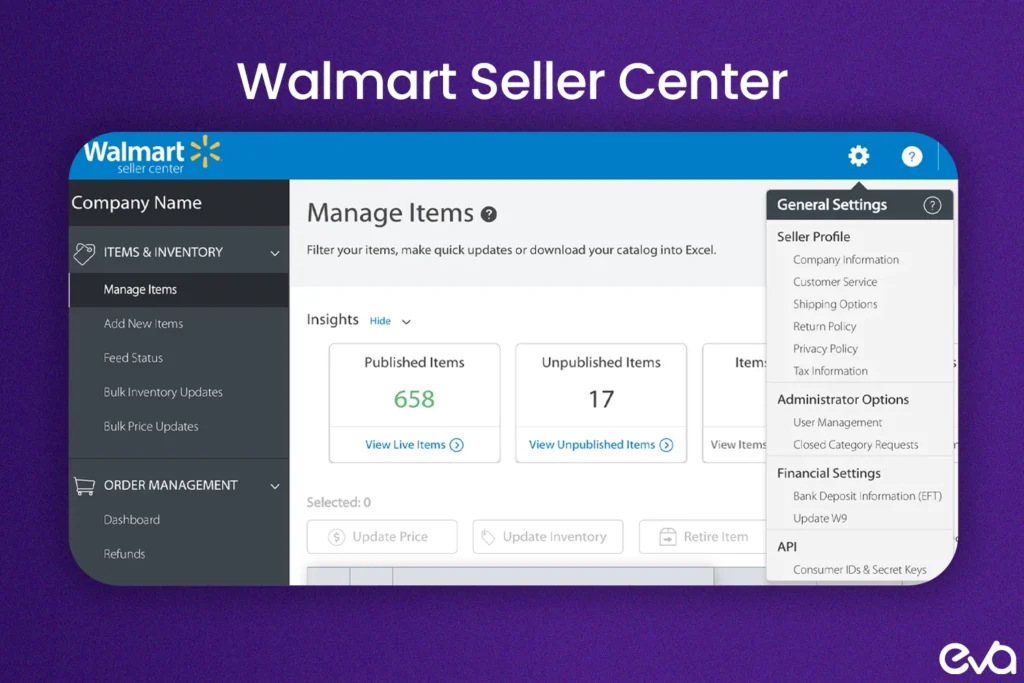
What is Walmart Seller Center?
Quick answer: Walmart Seller Center lets other companies sell their products on Walmart.com. Sellers use it to list products, keep track of stock, take care of customer orders, and boost their sales. It's a full package for sellers who want to tap into Walmart's big online market and connect with lots of shoppers.
Walmart Seller Center lets other companies sell their products on Walmart.com. Sellers use it to list products, keep track of stock, take care of customer orders, and boost their sales.
It’s a full package for sellers who want to tap into Walmart’s big online market and connect with lots of shoppers.
Selling on Walmart’s Marketplace isn’t just another platform, it offers a unique chance for eCommerce businesses to make money.
Walmart draws millions of visitors each day helping sellers reach more people and grow their business. This guide will show you how to set up a Walmart Seller Center account and give you tips to help you do well.
Overview of the Walmart Marketplace
Quick answer: The Walmart Marketplace is a dynamic platform that allows third-party sellers to offer their products to a broad and engaged audience. Walmart's strict approval process for sellers helps ensure that only reputable and reliable businesses gain access, increasing consumer trust.
The Walmart Marketplace is a dynamic platform that allows third-party sellers to offer their products to a broad and engaged audience.
Walmart’s strict approval process for sellers helps ensure that only reputable and reliable businesses gain access, increasing consumer trust.
Why Selling on Walmart is a Great Opportunity for Sellers
Quick answer: Selling on Walmart is a powerful way to diversify your revenue streams. With lower competition than Amazon and lower seller fees, Walmart provides a significant opportunity for brands to reach a new customer base while keeping costs down.
Selling on Walmart is a powerful way to diversify your revenue streams.
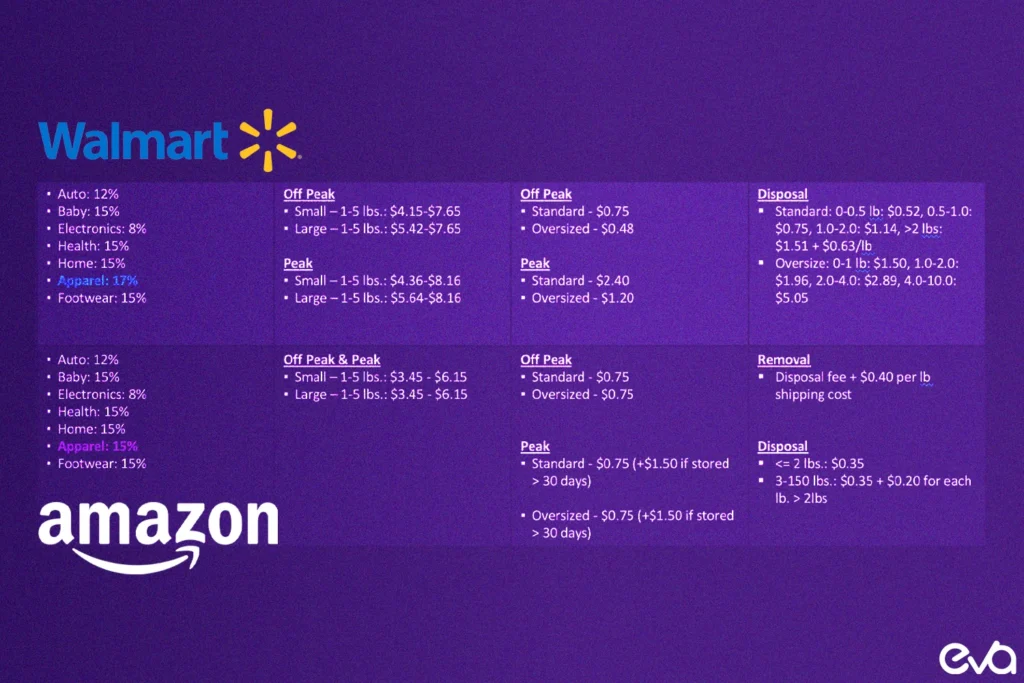
With lower competition than Amazon and lower seller fees, Walmart provides a significant opportunity for brands to reach a new customer base while keeping costs down.
Walmart’s marketplace proliferates, making it the perfect time for sellers to board.
Requirements for Joining the Walmart Seller Center Marketplace
Quick answer: Requirements for Joining the Walmart Seller Center Marketplace is important for How to Create a Walmart Seller Center Account because it shapes how Walmart teams make decisions, prioritize work, and measure whether marketplace activity is producing profitable growth. Before starting the application process, meet Walmart's seller qualifications and have the necessary documentation ready.
Before starting the application process, meet Walmart’s seller qualifications and have the necessary documentation ready.
Minimum Qualifications for Sellers
Quick answer: Walmart requires sellers to have an established business with a proven track record. Your company must demonstrate excellent customer service, competitive shipping times, and high-quality products. Additionally, your business should be based in the U.S.
Walmart requires sellers to have an established business with a proven track record. Your company must demonstrate excellent customer service, competitive shipping times, and high-quality products. Additionally, your business should be based in the U.S. or have a registered U.S. business entity.
Key Documents and Information Needed for Application
To apply, you will need the following documents:
- U.S. Tax ID
- Employer Identification Number (EIN)
- Detailed product and business information
- Ensure all the provided information is accurate and up-to-date to avoid delays in the approval process.
Step-by-Step Guide to Setting Up Your Walmart Seller Center Account
Quick answer: Step-by-Step Guide to Setting Up Your Walmart Seller Center Account is important for How to Create a Walmart Seller Center Account because it shapes how Walmart teams make decisions, prioritize work, and measure whether marketplace activity is producing profitable growth. Follow these steps to set up your Walmart Seller Center account and begin selling on the platform.
Follow these steps to set up your Walmart Seller Center account and begin selling on the platform.
Step 1: Apply to Join the Walmart Marketplace
Go to the Walmart Seller Center website and click “Apply Now.” Complete the registration form with your business name, tax information, and other necessary details.
Step 2: Review the Minimum Qualifications
Before submitting your application, review Walmart’s requirements to ensure you meet the necessary qualifications. Make sure you have your business documentation ready.
Step 3: Completing the Application Process
Submit your application with the required documents, including tax identification details and proof of business legitimacy. Double-check everything to avoid rejections or delays.
Step 4: Waiting for Approval and Next Steps
After submitting your application, you will receive a confirmation email. The review process typically takes a few days. If approved, you will receive an invitation to complete your seller profile.
Step 5: Setting Up Your Seller Profile
Once approved, log into the Walmart Seller Center and complete your seller profile. Include detailed information about your business, shipping, and return policies to ensure transparency.
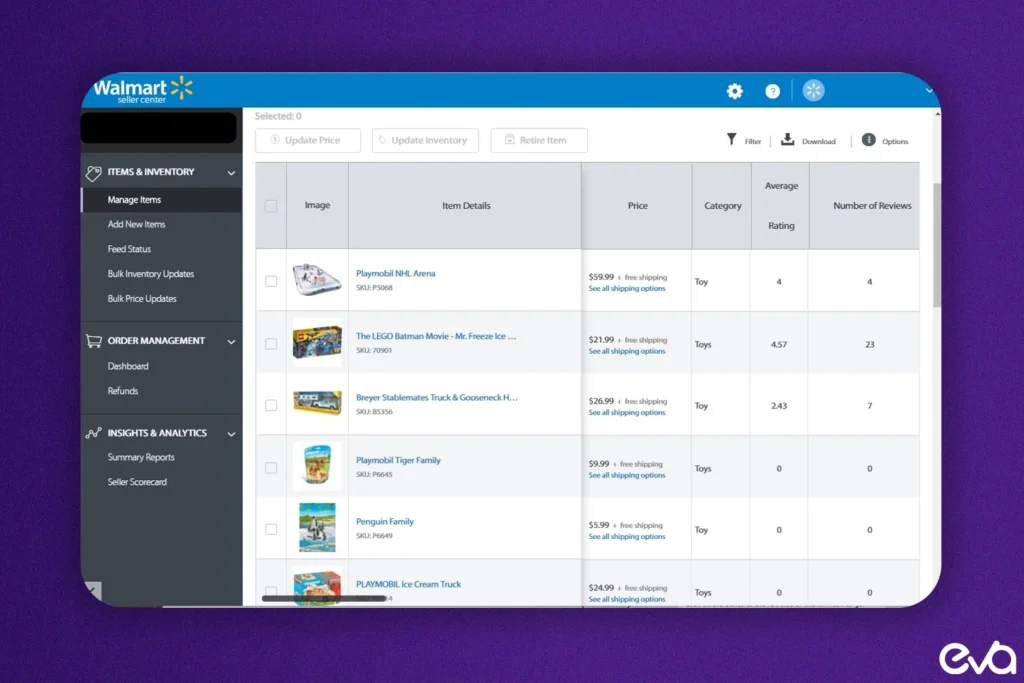
Step 6: Listing Your Products on Walmart
Provide detailed descriptions, high-quality images, and relevant keywords to add your product listings. Walmart offers individual product listings and a bulk upload feature for larger inventories.
Step 7: Uploading Your Inventory
Ensure that your inventory is accurately reflected in the Seller Center. Use Walmart’s bulk upload feature to sync your inventory, saving time and ensuring stock levels are always up to date to avoid cancellations.
Step 8: Preparing to Launch Your Walmart Store
Before launching, review your listings for accuracy and completeness. Ensure pricing is competitive, shipping times are correct, and your product images and descriptions are optimized for maximum visibility.
Best Practices for Successfully Setting Up and Managing Your Walmart Seller Account
Optimizing Your Product Listings for Better Visibility
Optimizing your product listings is crucial for success at Walmart. In your product titles, descriptions, and backend fields, include relevant keywords such as product names, features, and benefits. Use clear, high-quality images to attract customers and encourage conversions.
Inventory Management Tips for Walmart Sellers
Proper inventory management is key to maintaining good seller metrics at Walmart. Sync your inventory with Walmart’s system to avoid overselling, which can lead to penalties and affect your seller rating.
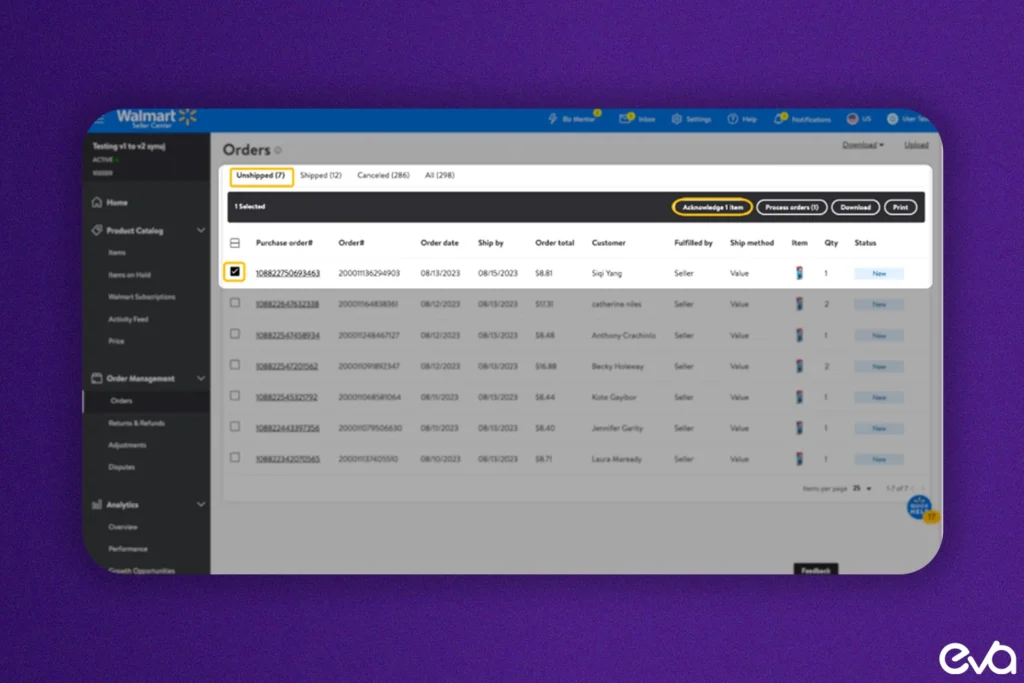
Managing Orders and Customer Service at Walmart
Fast response times and excellent customer service will help improve your seller rating. Walmart’s platform emphasizes speed and service, so ensure you consistently meet customer expectations.
Common Problems and Solutions When Creating a Walmart Seller Account
Troubleshooting Walmart Seller Central Login Issues
If you encounter login issues, ensure your email and password are correct. You can also try resetting your password or clearing your browser’s cache if the issue persists.
How to Access Walmart Seller Central and Resolve Common Problems
Walmart provides a help center where you can find detailed troubleshooting steps for any issues you encounter while managing your seller account.
How Eva Can Help?
As you start your journey at Walmart, having the right tools and strategies is essential. Eva, a leading eCommerce technology company, is here to support you. It helps brands like yours achieve profitable growth across Walmart, Amazon, and other major marketplaces, giving you the confidence to succeed.
Take your Walmart store to the next level with Eva’s AI-powered platform. Contact us today to optimize your listings, advertising, and inventory for maximum success.
Comparing Walmart Seller Account vs. Amazon Seller Account
Critical Differences Between Selling on Walmart and Amazon
Both platforms offer unique advantages. Walmart has fewer sellers, resulting in lower competition, while Amazon offers a more extensive customer base. Fees also differ, with Walmart generally having lower fees.
Which Platform is Best for Your Business?
Choosing between Walmart and Amazon depends on your business goals. Walmart may offer lower fees and less competition, but Amazon has a larger audience. Diversifying across both platforms can provide the best of both worlds.
Tips for Scaling Your Walmart Seller Account
Improving Seller Performance on Walmart
Focus on maintaining vital seller metrics, such as fast shipping times and positive customer reviews. Walmart’s algorithm prioritizes high-performance sellers, leading to better visibility and more sales.
Utilizing Walmart’s Marketing and SEO Features
Walmart offers performance advertising options to boost product visibility. Additionally, optimizing your listings with SEO best practices can enhance discoverability and attract more customers.
Leveraging Promotions and Walmart Ads to Boost Sales
Promotions and ads are effective tools for increasing Walmart sales. To maximize results, be sure to strategically time your promotions to coincide with high-traffic periods.
Walmart Seller Central Support and Training
Available Tools and Resources for Walmart Sellers
Walmart offers various support tools for sellers, including a dedicated Seller Help Center and Seller Academy. These resources provide tutorials and step-by-step guides on everything from setting up an account to optimizing listings.
Accessing Support and Training for New Sellers
Walmart’s seller support provides extensive resources to help new sellers navigate the platform. Whether it’sthey need to understand shipping options or learn how to optimize product listings, Walmart’s resources are comprehensive and easy to access.
Related Eva guide: Use the 2026 guide to selling on Walmart Marketplace for the full path from readiness through launch and scale.
Walmart Seller Center setup checklist for brands
Quick answer: Apply through Walmart directly, use accurate business information, and prepare catalog, fulfillment, pricing, and customer-service operations before approval. Buying or transferring an account creates serious ownership and compliance risk.
Seller Center is the operating environment for account settings, catalog setup, inventory, orders, performance, payments, and support. Approval is only the beginning. Brands lose time when the legal entity, product identifiers, shipping model, return process, and item data are not ready to work together. The fastest legitimate setup is the one that removes these dependencies before the application is submitted.
- Business identity: Use the legal entity, tax information, address, and banking details that belong to the operating company.
- Catalog readiness: Prepare valid product identifiers, category attributes, compliant images, descriptions, and variation relationships.
- Fulfillment: Choose seller fulfillment, Walmart Fulfillment Services, or a controlled combination before listing inventory.
- Launch controls: Define price floors, inventory buffers, order handling, returns, and the owner for performance alerts.
Brands should use the official Walmart signup path and keep account ownership internal even when an agency manages execution. Eva can manage the marketplace operation, but the brand should retain clear control of its entity, credentials, banking, and core account rights.
Useful resources: Official Walmart seller signup, Marketplace Expansion, Walmart Item Setup Guide.
Conclusion
Creating a Walmart Seller Center account involves applying, setting up your seller profile, and optimizing product listings. With the right strategies, Walmart offers an excellent opportunity to scale your business.
Maintaining excellent seller performance, leveraging Walmart’s marketing tools, and ensuring accurate inventory management is crucial to long-term success. By using tools like Eva’s AI-powered platform, you can ensure your Walmart business grows profitably and sustainably.
Related Eva guide: Before building the Walmart account, confirm the channel role and operating fit. Use Eva's 2026 Walmart vs Amazon comparison for the portfolio decision.
Walmart Marketplace application checklist
| Application area | Prepare | Common risk |
|---|---|---|
| Business identity | Consistent legal business name, address, tax information, and authorized representative details | Data that does not match official records |
| Marketplace experience | Current marketplace or direct-to-consumer performance evidence | Submitting unsupported revenue, catalog, or operational claims |
| Catalog | Product identifiers, compliant categories, competitive assortment, imagery, and content | Restricted products, poor data quality, or unclear assortment fit |
| Fulfillment | Accurate shipping templates, handling capacity, tracking, returns, and customer-service ownership | Unrealistic delivery promises or incomplete returns operations |
| Integration | Decide whether the team will use Seller Center, an API, or an approved solution provider | Applying before inventory and order systems are ready |
What to do if the application is delayed or rejected
- Review every submitted field for legal-name, address, tax, and contact inconsistencies.
- Confirm that the catalog is eligible and supported by valid product identifiers.
- Document fulfillment performance and the process for cancellations, tracking, returns, and support.
- Respond through the official application or support channel; do not purchase or transfer a third-party seller account.
- Keep a dated copy of the submission and any requested supporting documents.
Approval timing varies by application quality, verification requirements, category, and review volume. Plan the launch around operational readiness rather than an assumed approval date.
Related: This guide is part of Eva’s Walmart Marketplace agency guide hub, which links Eva’s Walmart guides in one place. For hands-on help, see Eva’s marketplace expansion service, or book a call.
FAQs
Walmart Seller Center is the platform where third-party sellers manage their product listings, orders, and inventory for Walmart Marketplace.
To apply, visit the Walmart Seller Center website and complete the registration form with your business details and required documentation.
Sellers must have an established business with excellent customer service and meet Walmart’s minimum qualifications, including U.S.-based registration.
Eva’s AI platform integrates data across multiple marketplaces to help Walmart sellers optimize their advertising strategies, manage inventory, and maximize profitability.
Walmart charges referral fees on each sale, which vary based on the product category.
Use relevant keywords, high-quality images, and detailed product descriptions to optimize your listings for higher visibility on Walmart Marketplace.
Eva’s AI platform offers real-time inventory management insights, helping sellers maintain accurate stock levels and avoid penalties.
Walmart offers performance-based advertising options, including Walmart Performance Ads, which can boost visibility and drive sales.
Walmart offers lower fees and less competition than Amazon, making it an excellent option for sellers looking to expand into a new marketplace.
Yes, Eva’s AI-powered platform provides data-driven insights to help you optimize your Walmart store, improve sales, and scale profitably.
Common Walmart Seller Center approval risks
Applications can stall when business identity, tax details, payout information, catalog data, fulfillment promises, or customer-support ownership do not match. Treat every application field as an operating-control requirement, not a formality.
- Keep the legal business and payout information consistent across submitted records.
- Validate product identifiers, attributes, images, pricing, and inventory before catalog upload.
- Document shipping, returns, customer support, and escalation ownership.
- Use only an account owned by the correct business; never buy or share a seller account.
After approval, review account health and fulfillment signals weekly.