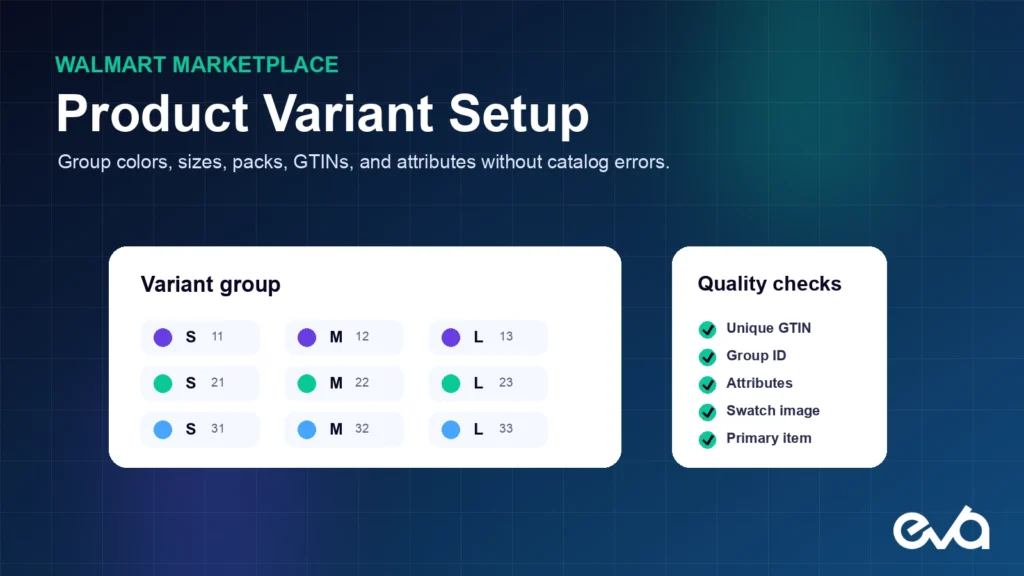
Walmart product variants let shoppers compare related sizes, colors, packs, flavors, or other options on one product experience. When the group is built correctly, it improves choice, catalog clarity, and searchability. When it is built poorly, items can separate, merge incorrectly, inherit the wrong content, or become unpublished.
Variant setup is not simply a spreadsheet task. It requires clean product identifiers, consistent group logic, unique attribute combinations, accurate images, ownership of the item content, and a maintenance process that survives catalog changes. Brands should treat the variant group as a governed catalog object.
Quick answer: To create reliable Walmart variants, give every sellable item a valid unique GTIN, use one consistent variant group ID, select attributes that truly distinguish the items, ensure every attribute combination is unique, choose the correct primary item, provide accurate swatches and images, and verify the result after processing.
Table of Contents
- How Walmart product variant groups work
- The Walmart variant setup framework
- 1. Map the variant family before uploading
- 2. Validate every product identifier
- 3. Use one stable variant group ID
- 4. Make every attribute combination unique
- 5. Select the primary item deliberately
- 6. Align swatches, images, and content
- 7. Choose the right setup method
- 8. Verify the Activity Feed and live PDP
- Common Walmart variant errors and fixes
- How Eva manages Walmart variant governance
- FAQ
How Walmart product variant groups work
A variant group contains individual items that differ by defined attributes. A shirt may vary by size and color. A beverage may vary by flavor and pack count. Every variant remains a distinct item with its own identifier, inventory, price, and offer, while Walmart presents the relationship as a grouped shopping experience.
Walmart’s current Marketplace Learn guidance says sellers can create and manage variant groups in Seller Center or through APIs. The platform supports editing groups, adding or removing items, adding variant attributes, and combining or separating groups. Some catalog relationships may also be merged by Walmart when identical items already exist.
Useful official references: manage a Walmart variant group, troubleshoot product variant errors, and troubleshoot item setup errors.
The Walmart variant setup framework
| Field | Operating rule | Common failure |
|---|---|---|
| GTIN | Use a valid unique product identifier for every sellable variant. | Wrong item match, content merge, return risk, or unpublishing. |
| Variant group ID | Use the same consistent ID for every item in the intended group. | Items split into separate groups. |
| Variant attributes | Choose attributes that distinguish real shopper choices. | Duplicate combinations or confusing selectors. |
| Primary item | Select the representative item deliberately. | Weak default content or merchandising. |
| Swatches and images | Map every visual accurately to its variant. | Shopper selects one option and sees another. |
1. Map the variant family before uploading
Start with a product-family map that lists every intended SKU, GTIN, product type, size, color, flavor, pack count, fulfillment method, inventory owner, and image set. Decide which attributes define shopper choice and which are merely descriptive.
Do not group products only because the brand considers them part of one collection. Variants should represent the same core product with meaningful option differences. Combining unrelated products can create confusing selectors, inaccurate content, poor conversion, and catalog disputes.
2. Validate every product identifier
Each Walmart variant is a separate sellable item and needs the correct unique product identifier. Verify the barcode on packaging, the manufacturer’s source data, and the quantity or version represented by the GTIN. A pack of 12 and a pack of 24 cannot share the same identifier.
Product-ID mistakes can cause the wrong listing match or merge. Walmart warns that mismatches may lead to inaccurate titles, images, descriptions, and specifications, which can produce returns and a poor customer experience. Build identifier validation into the item-setup process before the template reaches Seller Center.
3. Use one stable variant group ID
The variant group ID tells Walmart which items belong together. Every intended member of the group needs the same group ID. If the IDs differ, the items can appear as separate groups. If unrelated items reuse an ID, the group can become incorrect.
Create a naming convention that is stable across teams and integrations. Record the group ID in the catalog source of truth, not only in an upload file. When the group changes, document which items were added, removed, combined, or separated so future feeds do not recreate an old structure.
4. Make every attribute combination unique
Walmart requires variant items to have unique attribute information. If two items both appear as Blue with no other distinguishing value, the platform cannot present them as unique choices. Add the missing attribute, such as size or pack count, or correct the existing value so each combination is distinct.
Use the shopper’s language while staying consistent. Avoid having Navy, Navy Blue, and Dark Blue represent the same color unless the products are genuinely different. Attribute normalization improves filters, swatches, searchability, and downstream reporting.
5. Select the primary item deliberately
The primary item should represent the group well. Choose a variant with reliable inventory, strong content, accurate images, competitive pricing, and broad shopper appeal. The default should not be an obscure size, seasonal color, or low-stock configuration if a better representative item is available.
Primary-item selection is part of merchandising. Review the live experience after processing because catalog ownership, merged groups, and Walmart-controlled content can influence what appears. If the displayed result is wrong, document the item IDs, group structure, feed ID, and evidence before contacting support.
6. Align swatches, images, and content
Each variant should show the correct color, pack, flavor, or other option. Swatch images and primary images need a direct relationship to the attribute value. A shopper who selects Red should not see Blue packaging, and a shopper choosing a six-pack should not see a twelve-pack image.
Maintain variant-specific images where the physical product changes. Keep shared brand and benefit content consistent where appropriate, but do not erase differences that affect the buying decision. Accurate visual mapping reduces confusion, returns, and customer-service friction.
7. Choose the right setup method
Seller Center can be practical for smaller changes and individual items. Templates are better for larger batches, structured maintenance, and changes that need an audit trail. APIs are useful when the brand or integration partner manages catalog data programmatically at scale.
Whichever method you use, keep one authoritative product record. A manual correction in Seller Center can be overwritten by a later feed from an integration. Align the source data, transformation rules, and publishing system so the fix persists.
8. Verify the Activity Feed and live PDP
After submission, capture the feed ID and review processing status in the Activity Feed. Download and resolve error reports. Walmart notes that changes may take time to appear, so verify both the processing result and the live customer experience.
- Every intended SKU appears in the correct group.
- Every GTIN maps to the correct item and pack quantity.
- Attribute combinations are unique and readable.
- The primary item and default image are correct.
- Swatches select the correct product images.
- Price, inventory, fulfillment, and availability are accurate by variant.
- Mobile selectors work without hiding important options.
- No item is unexpectedly unpublished or separated.
Common Walmart variant errors and fixes
Duplicate attribute values: Add or correct the distinguishing attribute so every item has a unique combination. Missing group fields: Confirm the variant group ID, variant attribute name, and primary-item setting are complete. Incorrect merge: Validate the GTIN, pack quantity, product type, and source content before escalating. Lost images: Recheck the swatch image URL and variant-image mapping in the update source.
Change does not persist: Identify whether an API, feed, integration, or another catalog owner is overwriting the update. Item becomes standalone: Review the group ID and attributes, then verify whether Walmart controls the existing relationship. Large-group error: Follow the current platform limit and separate the group when required.
How Eva manages Walmart variant governance
Eva manages Walmart catalog structure as part of full-service marketplace expansion. Variant groups connect to item setup, content quality, images, inventory, pricing, fulfillment, Walmart Connect advertising, reviews, and profit reporting.
The goal is not only to clear an upload error. It is to maintain a catalog structure that shoppers can understand and the business can operate. Eva helps brands create the source data, resolve variant issues, verify the live experience, and prevent later feeds from undoing the work.
Related Eva guide: Use the Walmart listing optimization checklist to improve the parent item after variant relationships are stable.
Related Eva guide: Accurate variants help the delivered product meet the customer promise. Use Eva's Walmart customer reviews guide to improve the full experience.
FAQ
What is a Walmart product variant group?
It is a group of related individual items that differ by attributes such as size, color, flavor, or pack count and are presented together to help shoppers choose.
Does every Walmart variant need a unique GTIN?
Yes. Each sellable variant is a unique item and should use the correct unique product identifier for that specific version or quantity.
Why do Walmart variants split into separate groups?
Common causes include inconsistent variant group IDs, missing attributes, incompatible product types, duplicate values, feed overwrites, or catalog relationships controlled by Walmart or another source.
How long do Walmart variant updates take?
Processing and live display time can vary. Walmart’s guidance notes that some changes may take up to four hours to appear. Always confirm the Activity Feed status and the live product page.
Related Eva resources: Marketplace Expansion, Walmart.com Growth Playbook, Walmart Item Setup and Content Quality Score, Walmart Marketplace SEO, and Walmart Marketplace Management Services.
Variant accuracy can affect cancellations, returns, feedback, and customer response. Continue with Eva’s Walmart Seller Performance Standards guide for the complete operating controls.